
Start the estimate
Ask MillOS to estimate from a Chat.
An estimate starts in a Chat. Tell MillOS what you need priced, attach or point to the drawings, and send.
Start from your Project
Open the Project and choose Start a chat (or Open chat if the Project already has Chats). The empty Chat asks "What shall we work on?" and offers a few starting points:
- Organize this bid package
- What's in this project?
- Start the scope review
Choosing one fills the message box. Nothing is sent until you send it.
Start from the home page
Choose New chat in the sidebar. The home page asks "What are we" and finishes the question with a word that changes as you watch, such as pricing or estimating. The message box reads "Ask about a bid, or describe the job you are pricing". Four starting cards fill the box for you:
- Take off a package
- Read the finish schedule
- Check a bid before it goes
- What is in the set?
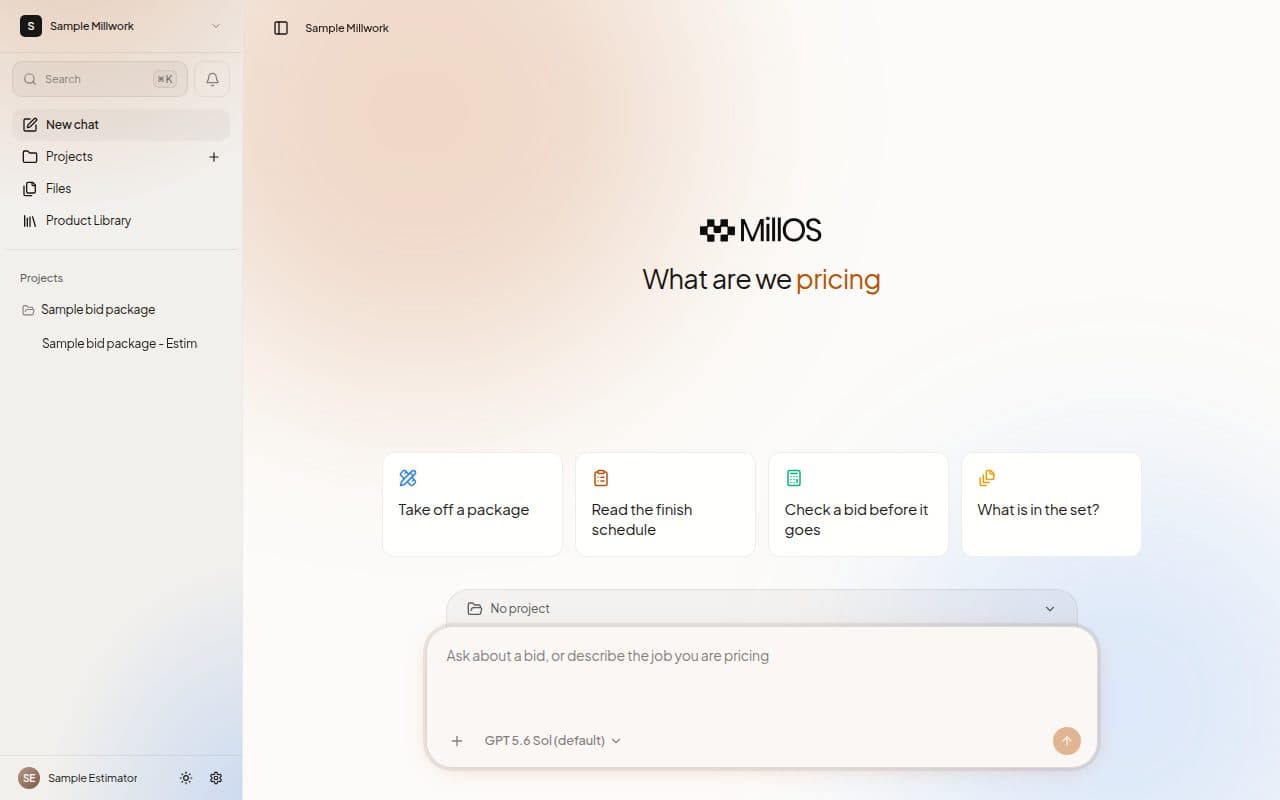
Use the Project selector to choose the Project the Chat belongs to, or No project for a standalone question. Then press Enter, or choose the send button.
Use a Project for drawings
A Project is best for a drawing package, because Takeoff Studio and the Estimate review need a Project to open its drawings. A Chat without a Project works well for a quick question.
Choose the engine
The Engine menu beside the message box chooses the model MillOS uses. The default carries a Default badge. In a Project the choice covers every Chat in that Project.
Slash commands
Type / at the start of a message to see quick actions such as Check the estimate. See Slash commands.
Next steps
Last updated on